
Sign in to your workspace

Wire harness design software

Design the harness once.
Build it right the first time.

Schematic, harness layout and 1:1 formboard share one live model, so a change in one is a change everywhere. Bills of materials, cut lists, build instructions and test programs are generated as you draw, for your whole team, on your own private server.
  • Runs in the browser, nothing to install
  • Live multi-user editing
  • Imports Arcadia .hrx and Excel
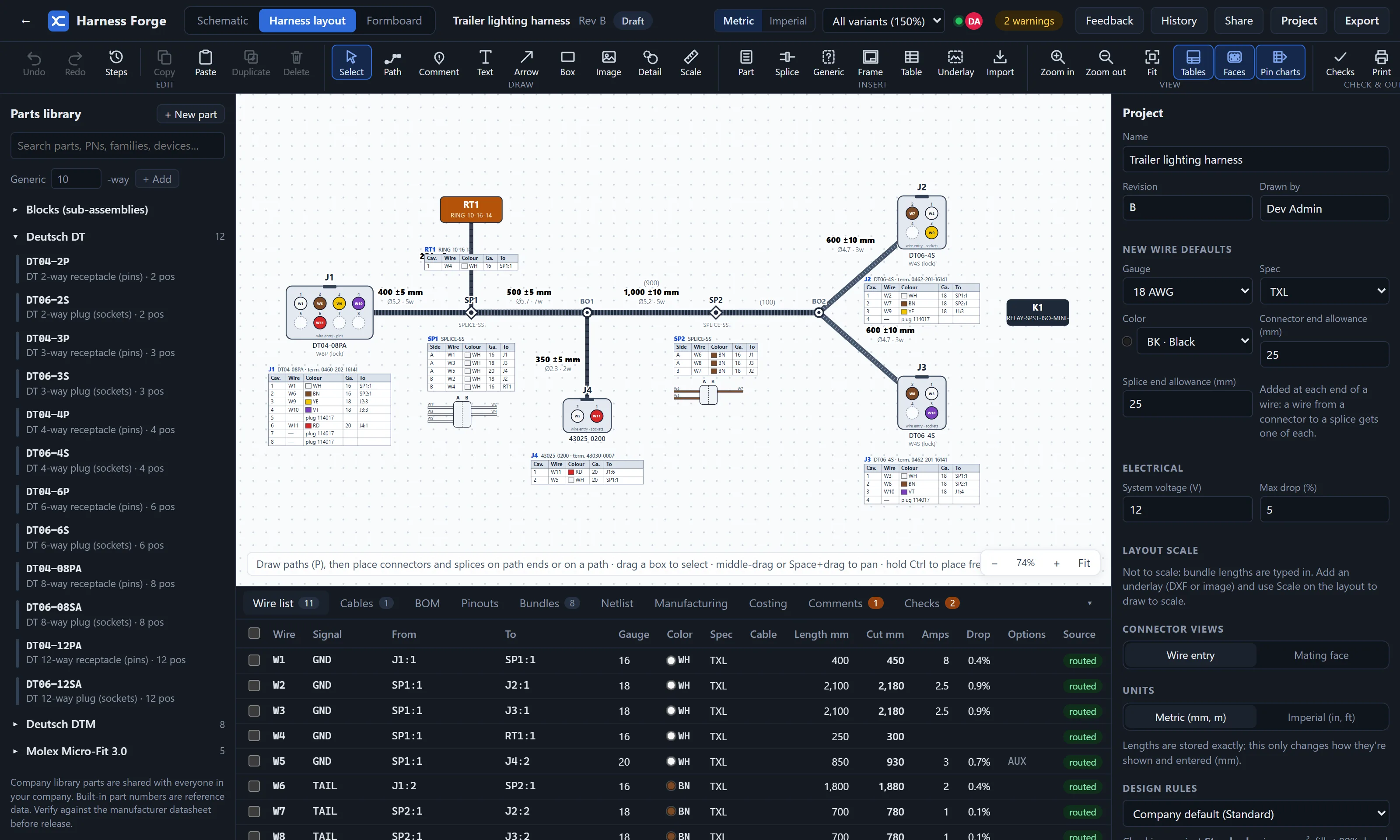
Harness layout · Trailer lighting harness
Harness Forge harness layout: bundles with lengths and tolerances, connectors drawn as cavity views with pin charts, and the wire list with routed and cut lengths, current and voltage drop.
One modelSchematic, layout and formboard never need syncing
Real lengthsEvery wire routed through the bundles, with cut allowances and tolerances
Shop-readyBOM, cut, crimp, splice and tool lists, Excel workbook, PDF drawing package
YoursA dedicated server per company, with your data and your users only

Design

From the first pin to the released drawing

Schematics that know the harness

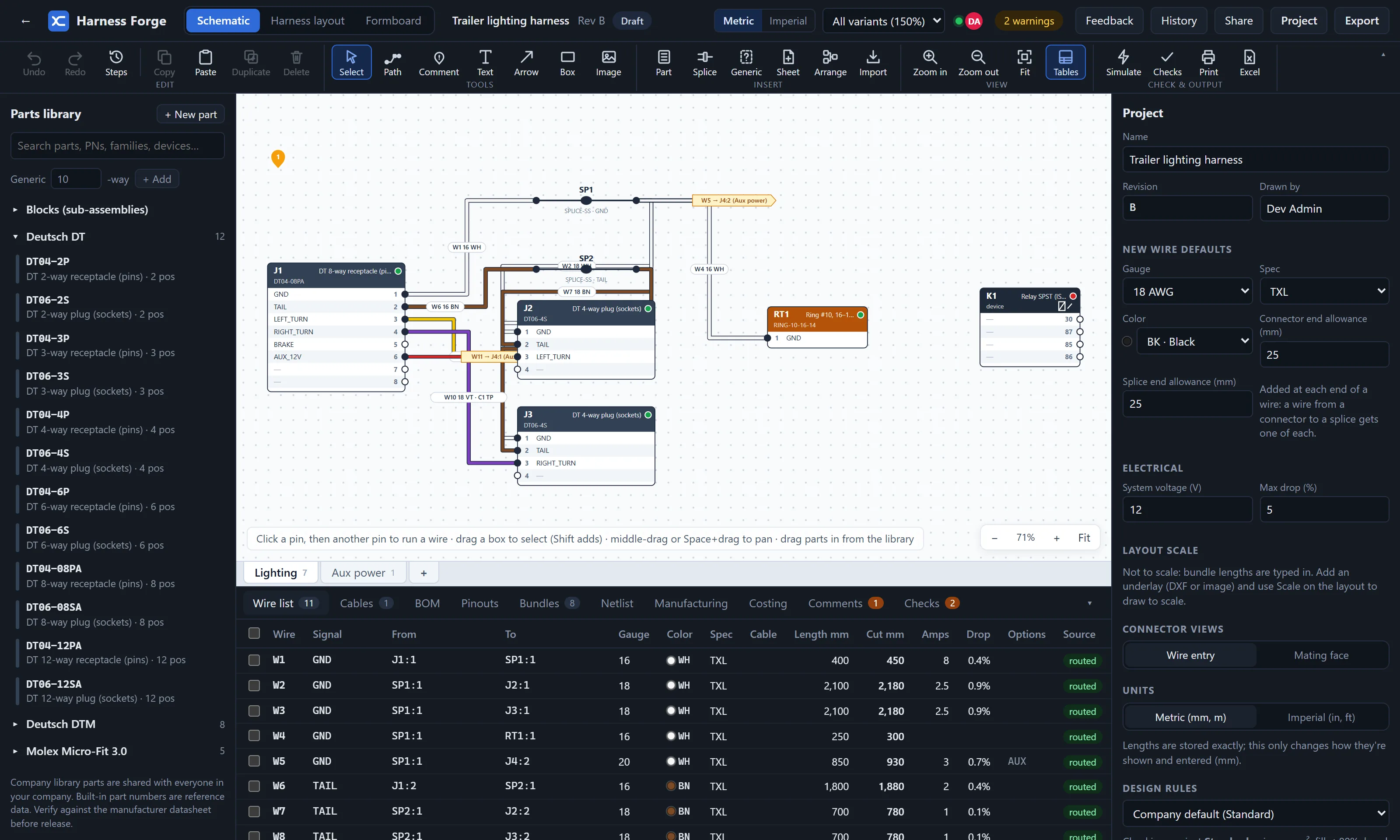
Multi-sheet schematics with signal names and click-to-wire. Every connector shows whether its wires are routed. Devices such as ECUs, relays, fuses, switches and lamps come with their pins.
  • Simulate switches, relays and fuses: live wires glow, loads light up
  • Electrical checks: voltage drop, ampacity with bundle derating, fuse coordination
  • Cables, twisted pairs and shields, billed by length or twisted in-house
  • Variants with option codes that filter drawings, BOM and reports
Schematic view with connectors J1, J2 and J3, splices SP1 and SP2, coloured wires and the wire list below.

Layout and formboard at true scale

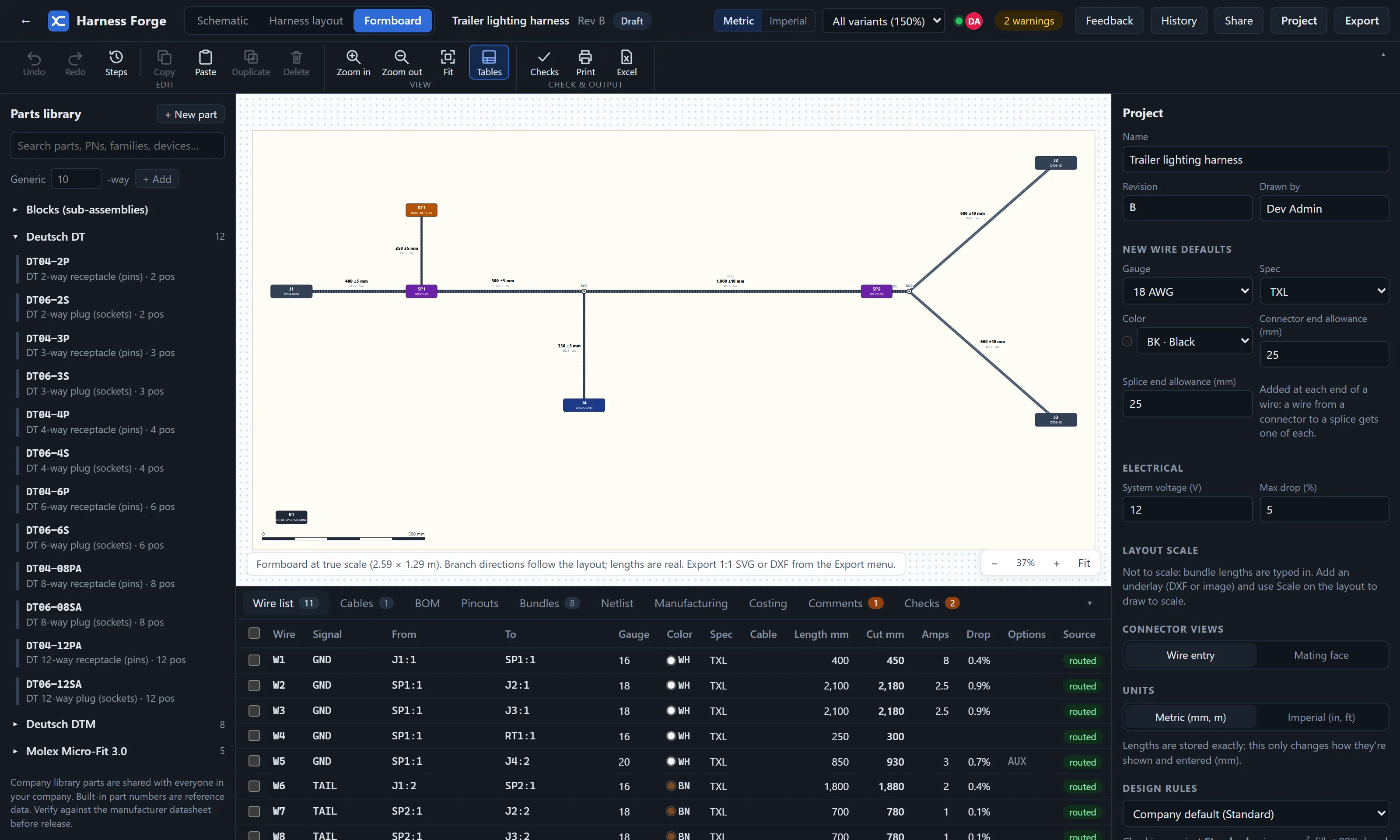
Draw bundle paths, drop connectors and splices on them, and every wire takes the shortest route. Lengths carry company tolerances, and coverings size themselves to the bundle.
  • 1:1 formboard as SVG or DXF, or tiled onto A4/Letter pages with a check bar
  • Underlays: trace over a vehicle or machine outline, DXF at true size
  • Pin charts, detail views and your own drawing frames and title blocks
  • Bend radius and fill checks on every bundle
Formboard view showing the harness at true scale with a 500 mm scale bar.

Live teamwork

Everyone in a project sees edits within a fraction of a second. Comments pinned to the drawing, @mentions, assignments, tasks with attachments.

Revisions and change orders

Draft → review → release, locked snapshots, revision compare with BOM deltas, ECOs with named approvers and printable change notices.

Company standards

Shared parts library, catalogues, design rule profiles (automotive, aerospace, industrial), cut-length rules, numbering patterns and revision schemes.

Bring your designs with you

Import Arcadia .hrx files, From-To lists from Excel or CSV, and supplier catalogues. Round-trip the wire list through Excel and review every change.

Customer portal

Share a project or a whole customer folder. Customers see released drawings and change notices, and approve or request changes.

Connects to your systems

REST API for BOMs, wires, cut lists, nets and checks; signed webhooks; Slack and Teams messages; single sign-on with Microsoft, Google or Okta.

Manufacturing

The shop floor gets what it needs, generated

No retyping into spreadsheets. Every output comes from the same design, and updates when it changes.

Bill of materialsTerminals, seals, plugs, coverings, labels and fixings filled in from the parts, with costs from your price list
Cut listOrdered by spec, gauge and colour, with strip lengths and your company cut rules
Crimp, splice and tool listsGrouped by crimp tool and terminal; splices with A/B sides and mm² per side
Splice weld settingsYour ultrasonic welder charts (EW-6030 preset), looked up from each splice's cross-section
Build instructionsStep by step: cut, crimp, splice, load connectors cavity by cavity, lay up, test
Test programPoint-to-point continuity and isolation, exported for your tester
Excel workbookUp to 14 sheets in one click, with report profiles per plant or customer
Drawing packagePDF with layout, BOM, schematics, connector charts and wire list, every sheet at paper size
"Is this print current?"A QR code on every sheet tells the floor whether that revision is still the release
Cost and weightUnit cost at any batch size with labour rates, and harness weight, per variant

Your server, your data

A private workspace for every company

Harness Forge isn't one big shared database. Each company gets its own dedicated server with its own database, storage and backups. Your designs are never mixed with another customer's.

Updates are rolled out for you, with an automatic backup before each one.

  • Two-step sign-in with any authenticator app; require it for admins or everyone
  • Single sign-on through Microsoft Entra ID, Google Workspace, Okta and others
  • Roles: admins, engineers, viewers, and outside partners who see only what's shared
  • Security log of sign-ins, failures, devices and changes, exportable
  • Encrypted nightly backups, checked for integrity, restorable on request
  • Hardened servers: HTTPS only, key-only admin access, intrusion blocking, automatic OS security updates

Getting started

Up and running in days, not months

  1. Talk to usShow us a harness you build today. We'll walk through it in Harness Forge.
  2. Your workspaceWe set up your private server at its own address, with your company name and seats.
  3. Bring your dataImport existing designs and your parts list. Set your standards once.
  4. Invite the teamEngineers, viewers and partners join from an invite link. Work in any modern browser.

See it on one of your harnesses

Tell us a little about your team and what you build. We'll set up a demo, or a trial workspace for you to try.

hello@harnessforge.ca

Made in Canada by Eh Team Studios.